- TypeScript 68.2%
- Python 31.7%
- JavaScript 0.1%
 f41109317e
Why: cross-checking the v1.16.0 release notes surfaced two stale dialog descriptions. radio.rxgain (get/set remote, set_radio.rxgain local) said SX1262/SX1268 only, but v1.16.0 enables the command for LR1110 boards (T1000e) - upstream PR #2235 - so the old text told those users the command was unavailable. The get flood.advert.interval example showed 12, the pre-v1.16.0 default; firmware default is now 47 hours (upstream PR #2608). Tests: npm run build clean; npm test 220/220 pass. Bundle redeployed to the HA host (MD5 a06e4df7b57c85e5cd53489ddb4d74a7); the dropdown validation User Action on the previous commit covers this bundle. |
||
|---|---|---|
| .github/workflows | ||
| assets | ||
| custom_components | ||
| frontend | ||
| tests | ||
| .gitignore | ||
| CHANGELOG.md | ||
| hacs.json | ||
| info.md | ||
| INSTRUCTIONS.md | ||
| LICENSE | ||
| pyproject.toml | ||
| README.md | ||
| requirements_test.txt | ||

MeshCore Chat for Home Assistant
A sidebar chat panel and persistent message store for the MeshCore mesh radio network that was written by an agent, thoroughly reviewed and carefully tested by a human.
Works as a companion to the core meshcore integration — install both. This integration does not drive the radio itself; it adds a chat UI, message persistence, and search on top of the events and services exposed by the core integration.
Status: v0.2 in active development.
Features (v0.2)
- Sidebar chat panel with channels, DMs, and contact list
- Persistent message history (survives Home Assistant restarts)
- Trace / path-discovery dialog with route visualization
- Per-conversation search
- Unread counts, delivery status
- Live device telemetry, neighbor tables, and remote command issue from the same UI
- Network-wide node discovery view (typically hundreds of nodes)
Screenshots
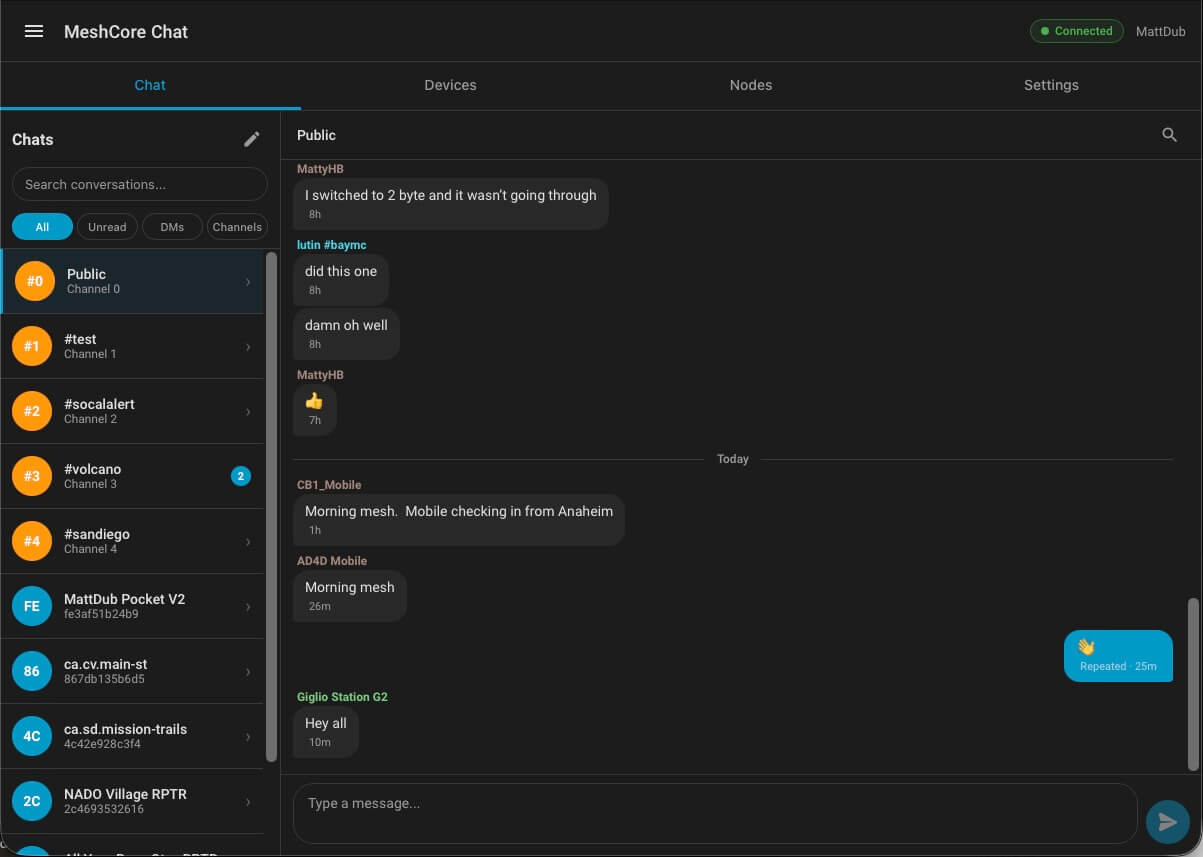
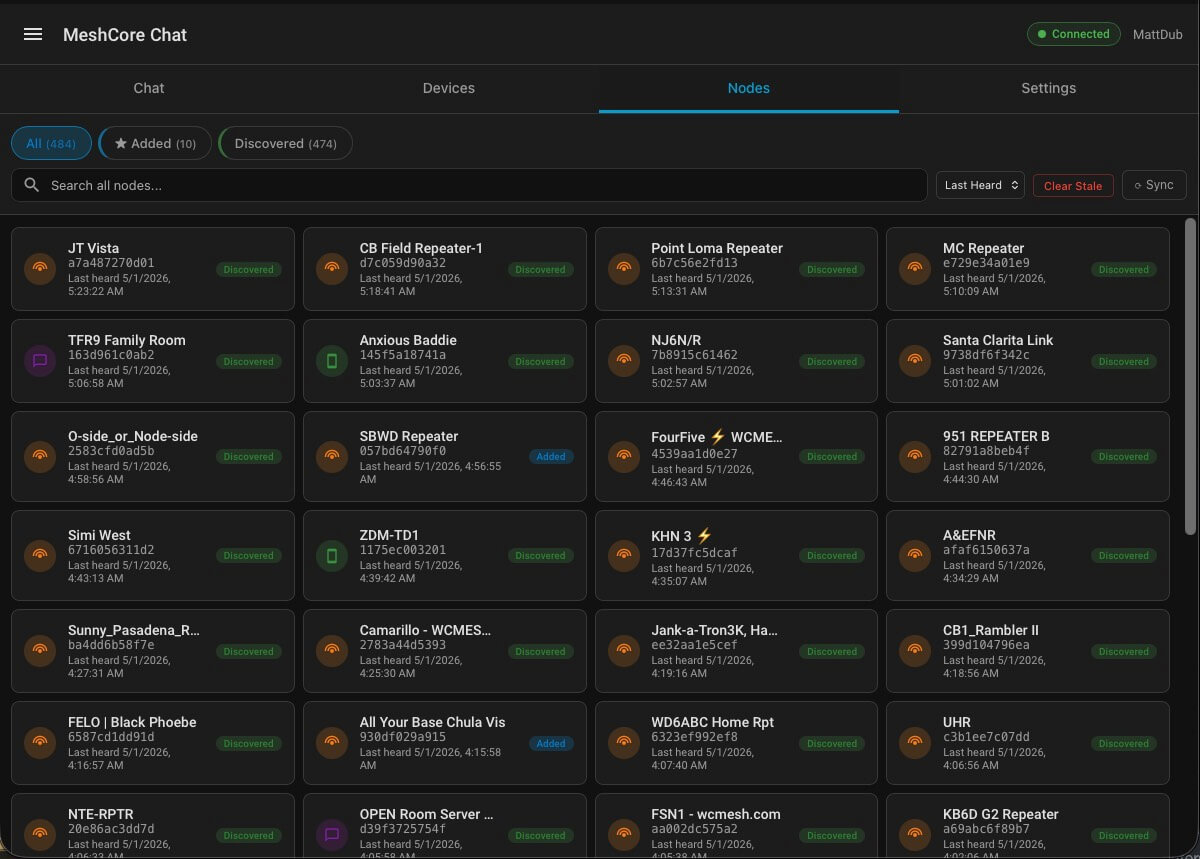
The four main tabs
 |
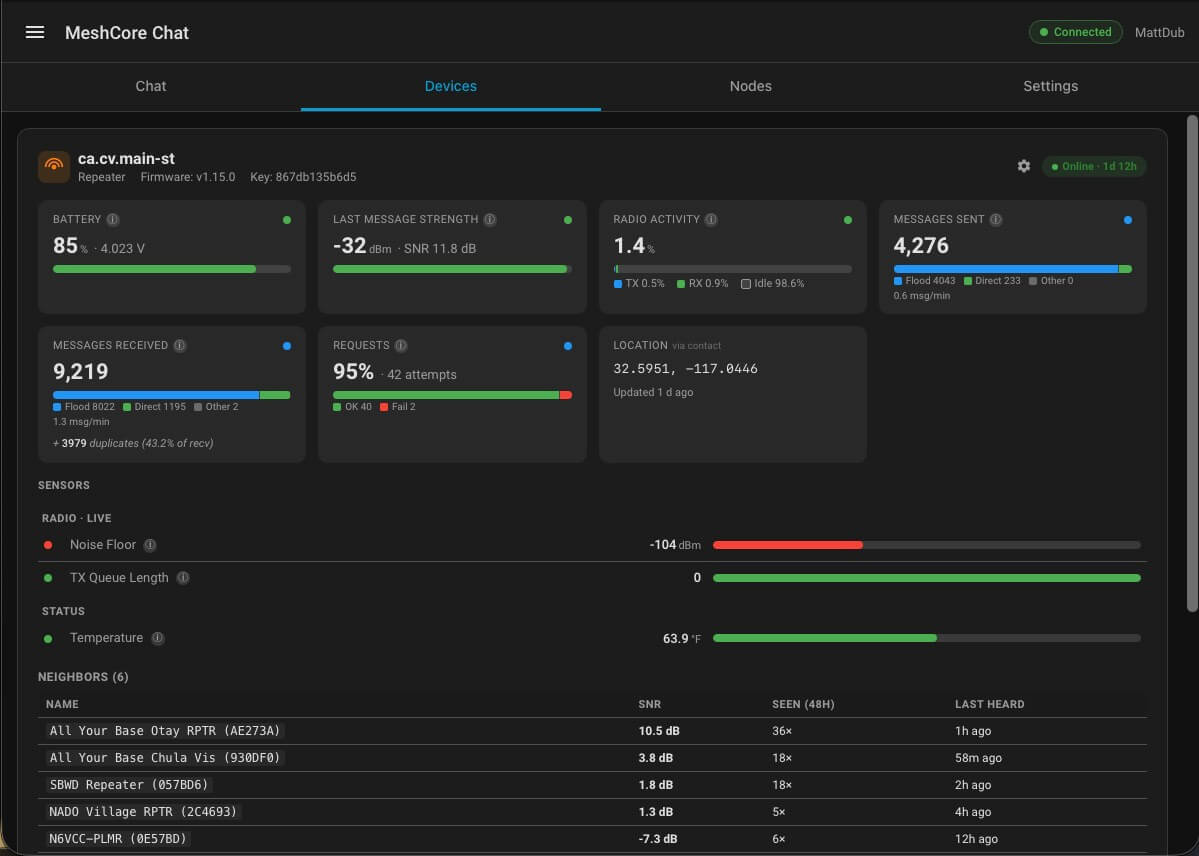 |
| Chat — channels and DMs in the left rail with All / Unread / DMs / Channels filters; messages rendered with sender, age, and delivery status (Repeated / Sent / Waiting). | Devices — per-device sensor tiles (SNR, RSSI, airtime, battery, message counts) with a neighbor table and quick-action buttons (Flood Advert, Sync Clock, Req Telemetry, Req Status). |
 |
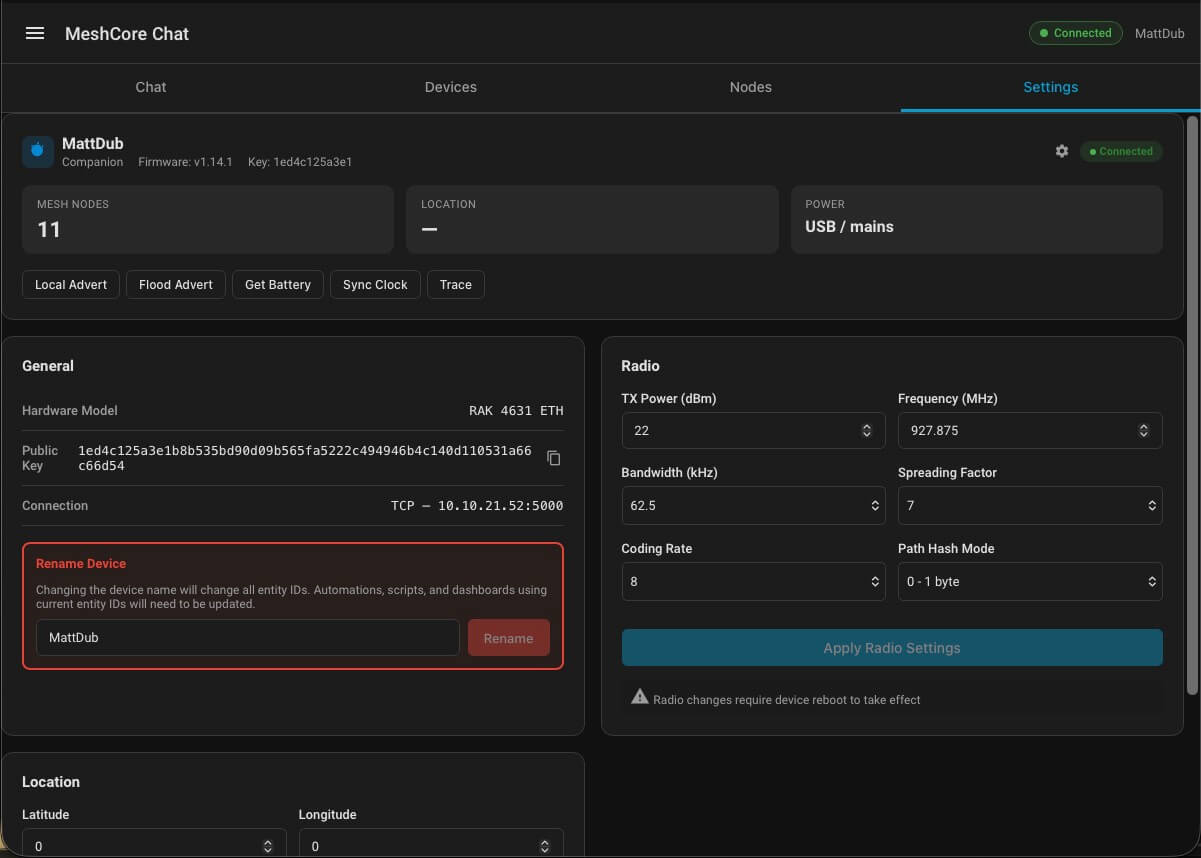 |
| Nodes — full network discovery view (All / Added / Discovered, then Clients / Repeaters), with search, last-heard sort, and stale-record cleanup. | Settings — companion device profile, radio configuration (TX power, frequency, bandwidth, spreading factor, coding rate, path hash mode), rename, and location. When Self Diagnostics is enabled in the upstream meshcore integration, the companion card also shows the same rich tiles managed devices have (battery, signal, radio activity, message counts) plus a diagnostics sensor table. |
Chat features
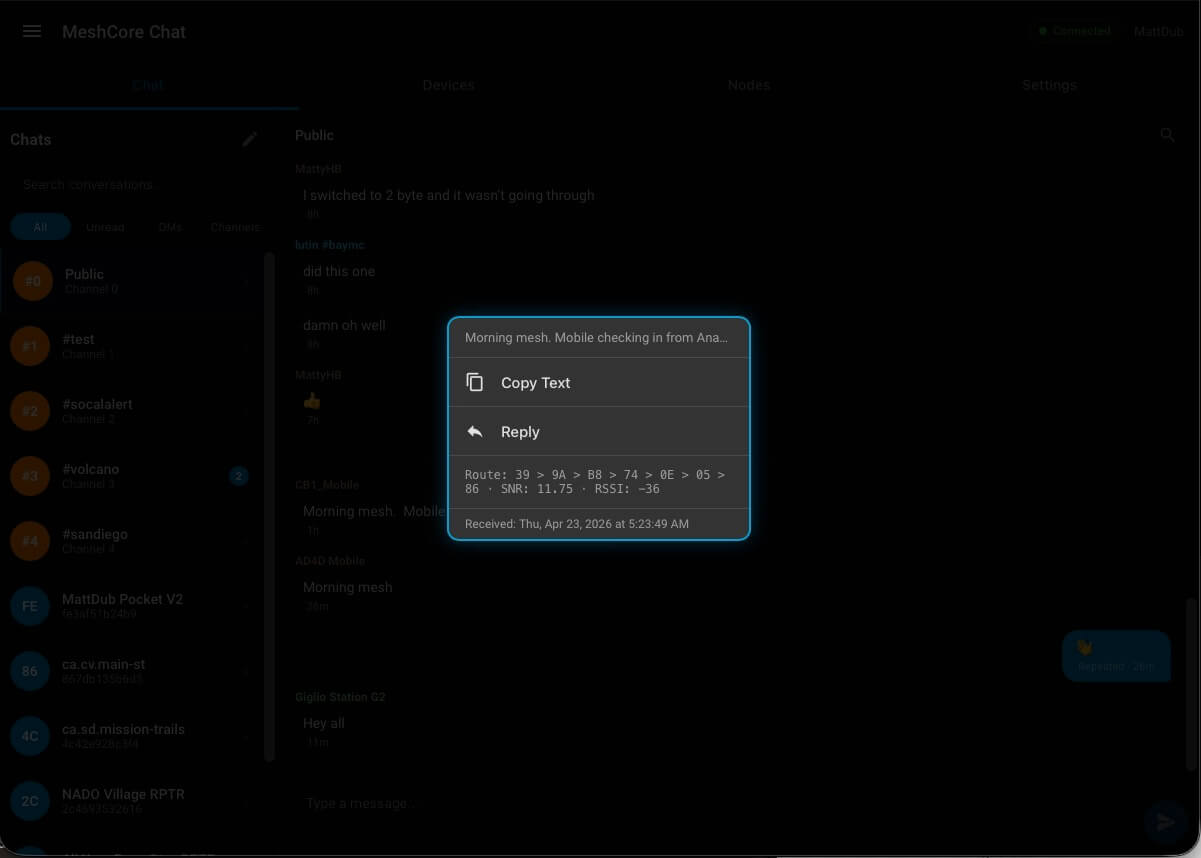 |
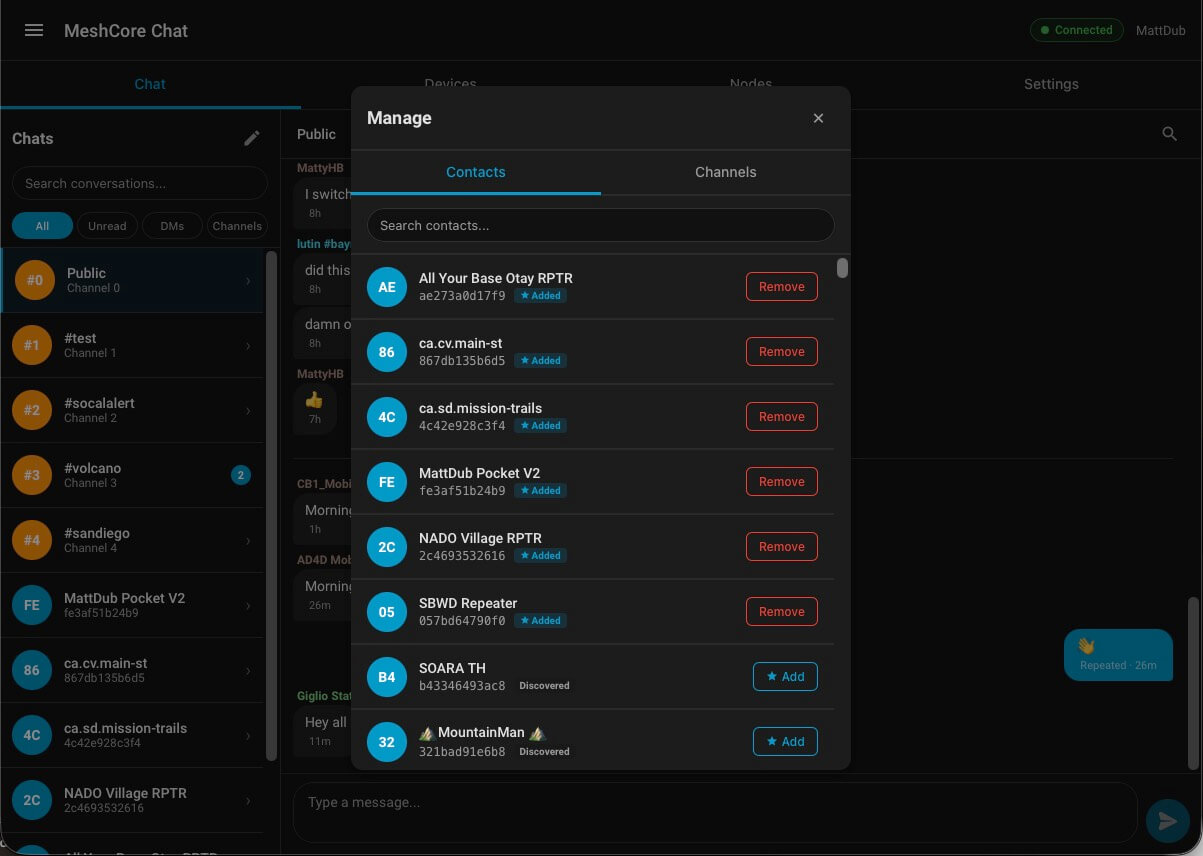 |
| Message popup — click or tap any message for Copy / Reply, plus the route metadata: hop sequence, SNR, RSSI, and exact receive timestamp. | Manage contacts & channels — promote any discovered node to an Added contact, or remove it; channel list lives on the second tab. |
Nodes features
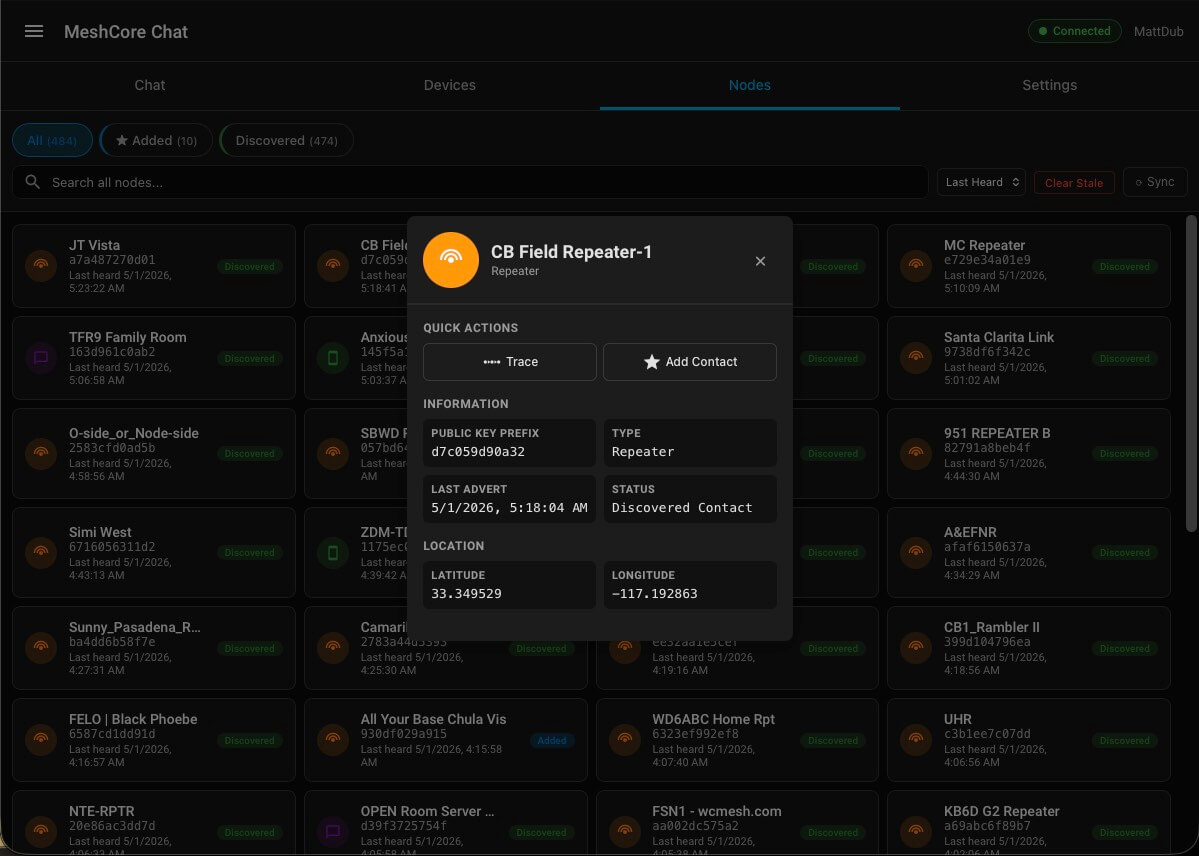 |
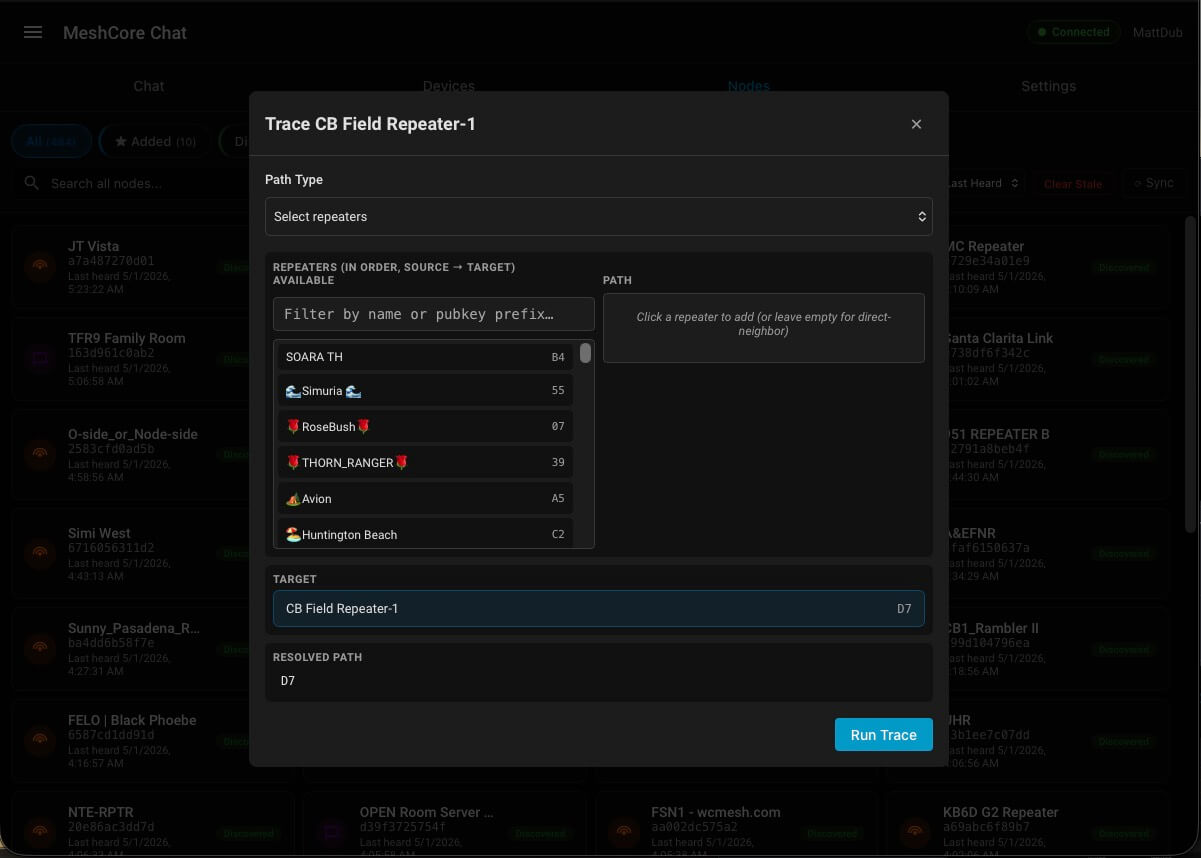 |
| Node details — click any node tile in the Nodes tab to open quick actions (Trace, Remove Contact), public-key prefix, type, last advert, and location. | Path trace — launched from the Trace quick action in the Node details dialog; pick repeaters in order to test a multi-hop path, or run a direct-neighbor probe; resolved path is shown alongside. |
Device management
 |
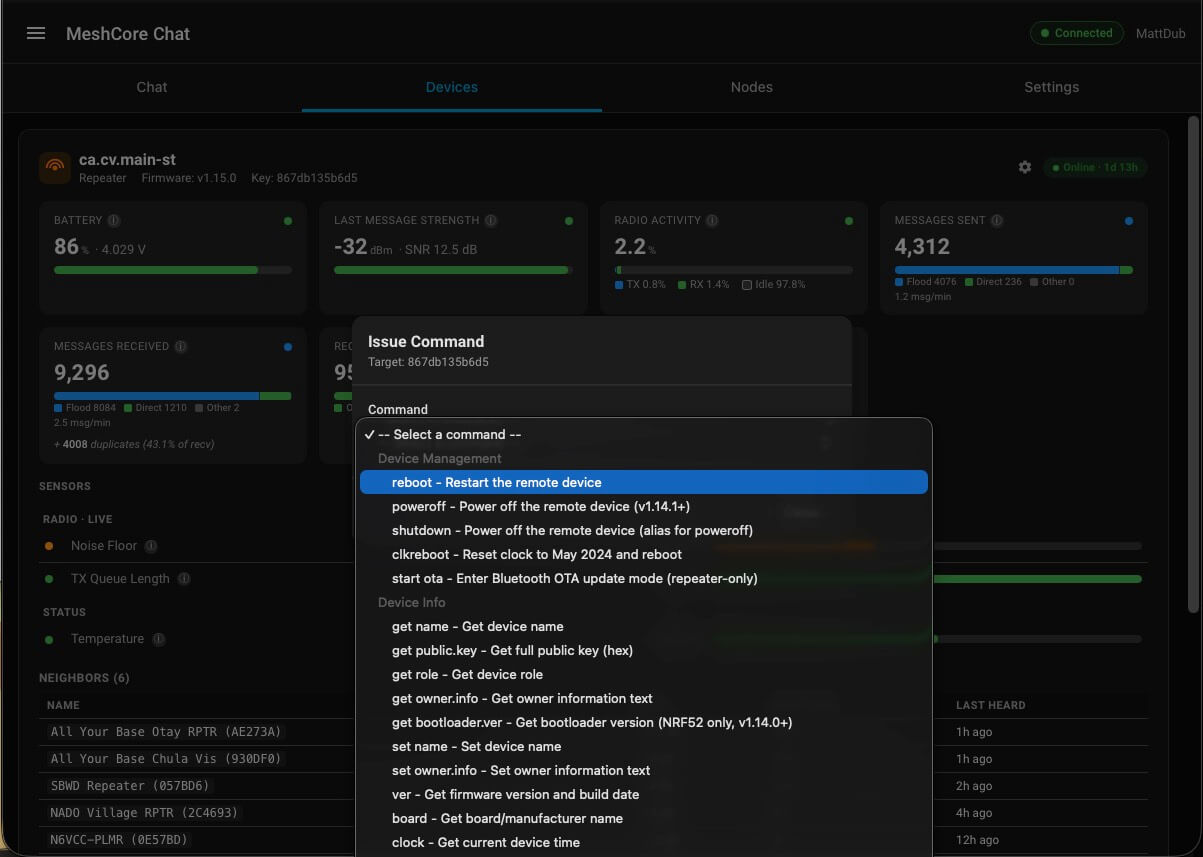 |
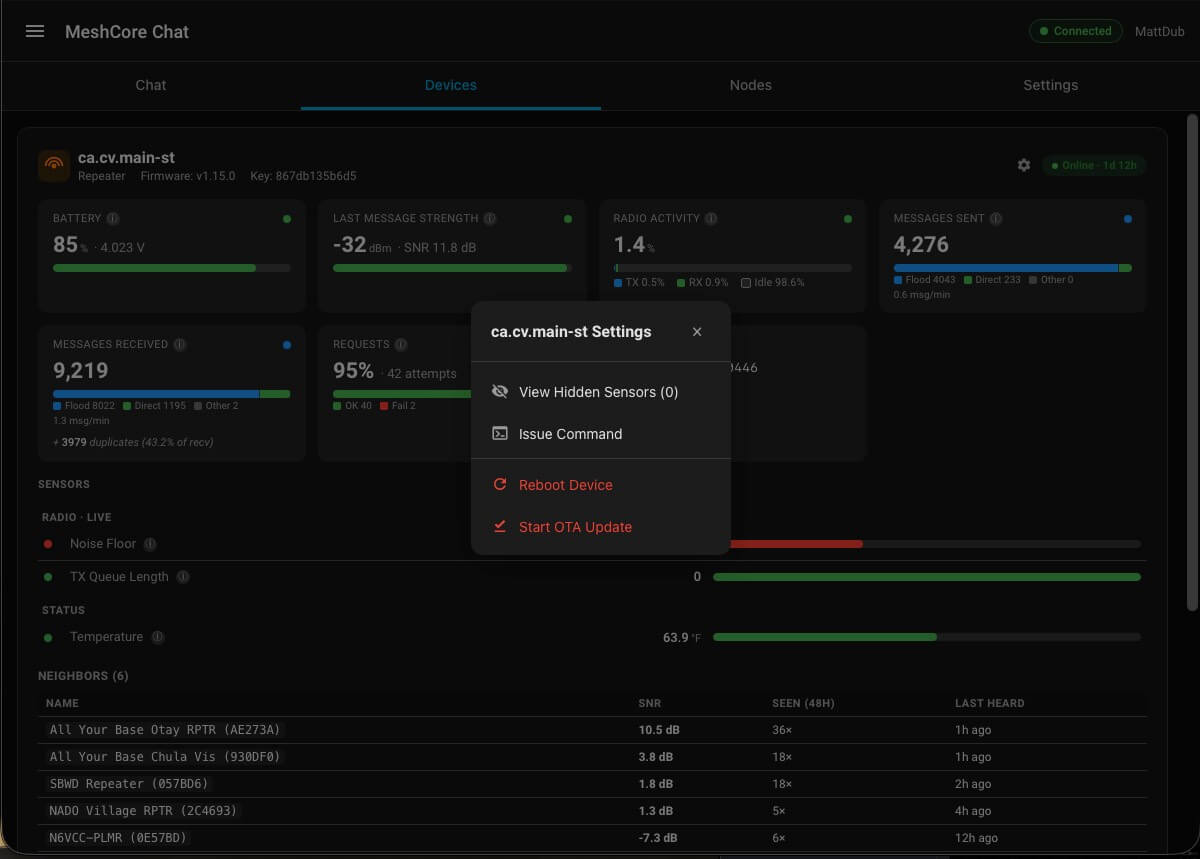
| Device settings menu — per-device gear menu: View Hidden Sensors, Issue Command, Reboot, Start OTA Update. | Issue Command — full command catalog grouped by category (Device Management, Device Info, etc.) — drives the underlying meshcore service from the panel. |
 |
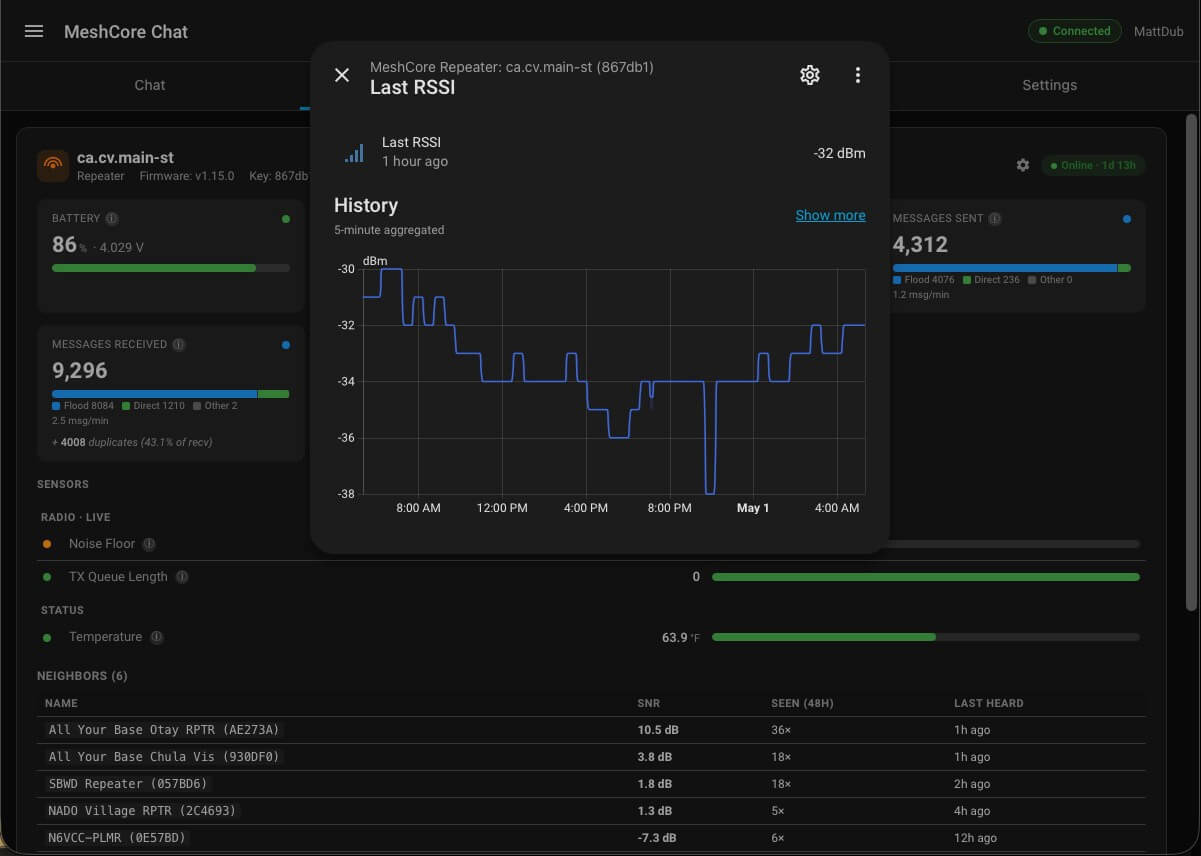 |
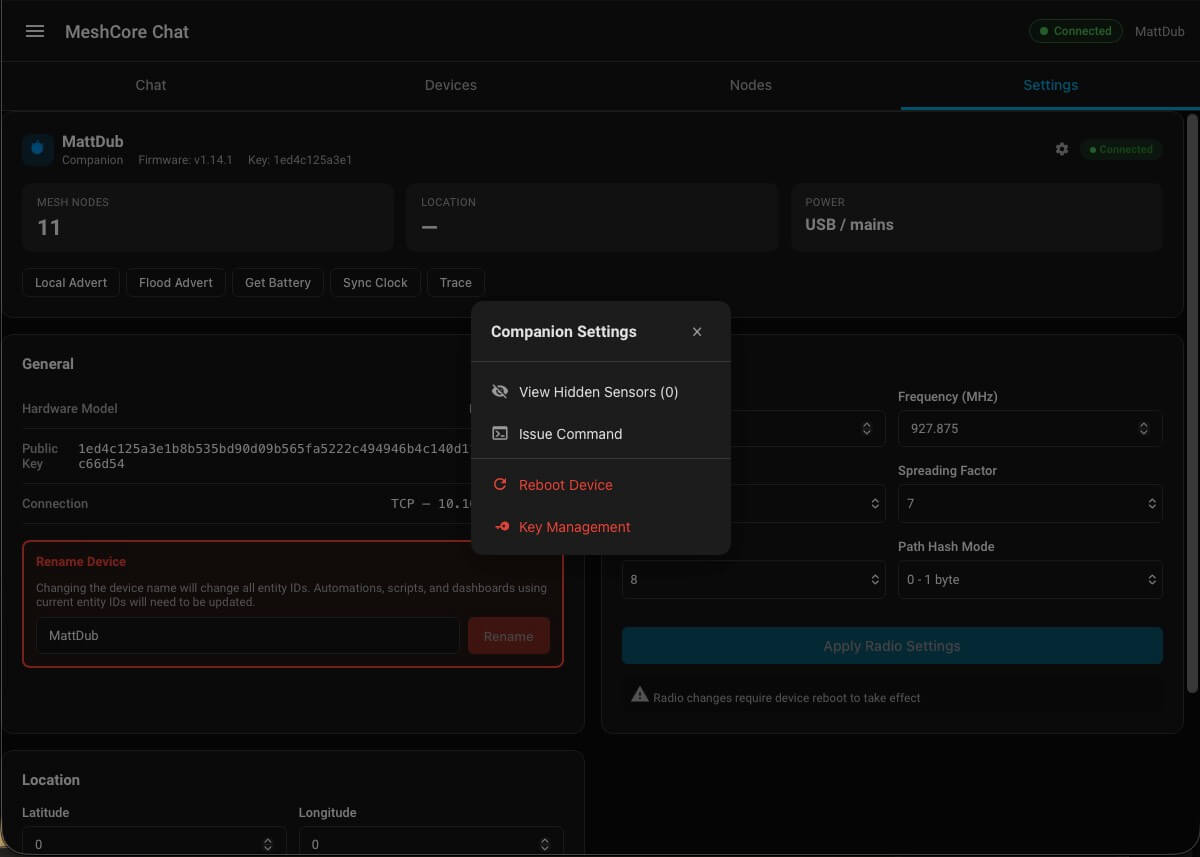
| Companion settings menu — same gear menu pattern for the local companion device, with Key Management as an additional option. | Sensor history — clicking any sensor tile opens Home Assistant's standard more-info dialog with full historical chart. |
Installation
HACS (custom repository)

Click the badge above to open this repository in your HACS dashboard, or follow the manual steps:
- In HACS → Integrations → ⋮ → Custom repositories
- Add
https://github.com/mwolter805/meshcore-ha-chatas an "Integration" - Install MeshCore Chat
- Restart Home Assistant
- Settings → Devices & Services → Add Integration → MeshCore Chat
Manual
Copy custom_components/meshcore_chat/ into your HA config/custom_components/ directory. Restart HA. Add the integration from the UI.
Usage
For a walkthrough of common tasks (adding contacts, managing channels, issuing commands, tracing paths, changing radio settings) plus operational warnings (radio-reboot requirements, the entity_id rename gotcha), see INSTRUCTIONS.md.
Permissions. Reading messages and browsing the panel works for any authenticated HA user. Destructive actions — radio reconfiguration, identity regeneration, channel-key changes, issuing commands, adding / removing / blocking contacts, and running path traces — require administrator rights on your HA instance. See INSTRUCTIONS.md → Permissions for the full list.
Requirements
- Home Assistant 2024.12 or newer
- The core meshcore integration v2.6.0 or newer installed and configured. The chat companion calls the structured query services (
meshcore.get_contacts,meshcore.trace) introduced in 2.6.0 (released 2026-04-27); on older versions the trace dialog returns a "service not registered" error and the contact list falls back to a legacy code path with a one-time warning in the logs.
Relationship to other projects
- meshcore-dev/meshcore-ha — the core integration that drives the MeshCore radio. Required.
Use cases
- Off-grid mesh chat panel. Run a tablet in your kitchen showing the MeshCore Chat sidebar; talk to local mesh peers without leaving Home Assistant.
- Search recent traffic. "Who pinged the @[Repeater Cliff] node yesterday?" — date-range message search across all conversations.
- Path diagnostics. Trace the route a message took (hops, SNR, RSSI per repeater) right from the message bubble.
- Managed-device dashboard. Monitor battery, last-heard, neighbour SNR, and uptime on every repeater you've added — one card per device.
Known limitations
- Requires meshcore ≥ 2.6.0. Older versions fall back to direct coordinator reads where supported, but Trace and Get Contacts use upstream services that landed in 2.6.0.
- Message archive is not a long-term log. Default retention is 90 days, capped at 500 messages per conversation. Configurable via Settings → MeshCore Chat → Configure (range 1–365 days, 50–5000 messages).
- Discover-mode traces don't always return. Flood path discovery on multi-hop routes sometimes silently drops. If a Discover trace fails, switch to Select repeaters or Enter path in the trace dialog to specify the route explicitly.
Removal
To uninstall:
- Settings → Devices & Services → MeshCore Chat → ⋮ → Delete.
- Optional: remove the message archive from disk:
The archive is per-entry; deleting the config entry does not remove these files automatically (HA's standard behaviour). Skip this step if you intend to re-add the integration later — the archive will be re-attached.rm /config/.storage/meshcore_chat.* - If you also want to uninstall the underlying meshcore integration: Settings → Devices & Services → MeshCore → Delete, then remove
custom_components/meshcore(HACS or manual).
Development
Contributions and bug reports welcome — file issues at github.com/mwolter805/meshcore-ha-chat/issues.
Repo layout
custom_components/meshcore_chat/— the Home Assistant integration (Python).frontend/— the Lit-based sidebar panel (TypeScript). Rolled up into a single bundle that lands atcustom_components/meshcore_chat/meshcore-chat-panel.js.tests/— Python test suite (pytest +pytest-homeassistant-custom-component).frontend/tests/— frontend unit tests (vitest).
Python tests
The integration targets the Python version shipped in the current HA OS / Docker image (3.14 as of HA 2025.x). Set up a local venv:
cd meshcore-ha-chat
uv venv --python 3.14 .venv
.venv/bin/pip install pytest-homeassistant-custom-component
pytest-homeassistant-custom-component (PHACC) transitively pulls in Home Assistant core, pytest, pytest-asyncio, and the full HA test fixture surface — no other install steps are needed. The integration is not installed as a package; tests/conftest.py puts the repo root on sys.path so custom_components.meshcore_chat.* is importable directly.
Run the suite:
.venv/bin/pytest tests/                    # full suite (~1s)
.venv/bin/pytest tests/components/meshcore_chat/test_ws_api.py -k identity
Do not
pip install -e .[test](or any pip install) inside a running Home Assistant Docker container. The editable-install metadata persists acrosspip uninstalland crashes HA on the next restart withFileNotFoundErrorfromasync_get_custom_components. Always use a separate venv.
Frontend
cd frontend
npm install
npm run build       # production bundle (minified)
npm run dev         # rollup watch mode
npm test            # vitest, run once
npm run test:watch  # vitest in watch mode
npm run lint        # eslint
The build writes straight to ../custom_components/meshcore_chat/meshcore-chat-panel.js. Committing the rebuilt bundle does not deploy it — for that, see below.
Deploying a dev build to a live HA host
After npm run build, copy the rebuilt panel bundle to your HA host:
scp custom_components/meshcore_chat/meshcore-chat-panel.js \
    root@<ha-host>:/config/custom_components/meshcore_chat/
Then hard-refresh the panel in the browser (Cmd/Ctrl-Shift-R). No Home Assistant restart is needed for frontend-only changes — the panel is reloaded from disk on browser refresh.
For Python-side changes (anything under custom_components/meshcore_chat/*.py), SCP the changed files and reload the integration: Settings → Devices & Services → MeshCore Chat → ⋮ → Reload, or restart HA if the change touches __init__.py, the config-flow, or anything wired at setup time.
Tips & Troubleshooting
The integration should be fairly easy to understand and navigate, for instructions on dialog pop-ups and operational gotchas worth knowing, see INSTRUCTIONS.md.
License
MIT — see LICENSE.